CLEARANCE SALE UPTO 75% OFF X
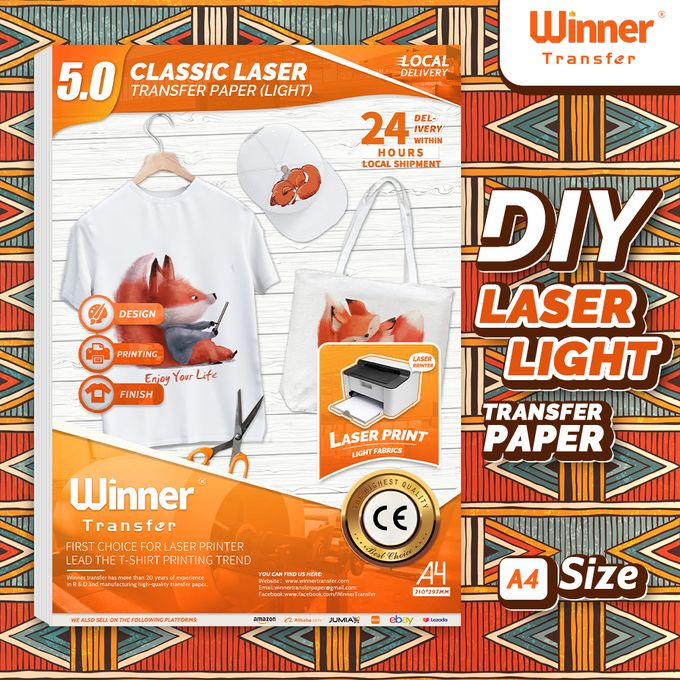
Winner Transfer Laser Light 100 Sheets Transfer Paper Printable Vinly For Cotton
0
0 Reviews 0 Orders 0 Wish listed
KES100.00 KES98.00 (Tax : )
Quantity:
Total price :
 

Product details

Search WinnerTransfer Discover More Transfer Papers

IRON 

Set iron to Cotton/Jeans Setting and TURN OFF steam.

Apply FIRM, EVEN and HEAVY pressure and iron each area of the image for 5 seconds. Circularly press and iron the image. (A4 size image, press 3-5 minutes. 1/2 A4 size image, press 2-3 minutes. 1/4 A4 size image, press 1.5-2 minutes )

Ensure that all areas of the image is ironed, especially the corners and edges.

NOTES:

Apply ENOUGH pressure on the transfer as more pressure will help transfer all of the print onto the fabric.

INSUFFICIENT PRESSURE and IRONING TIME would achieve poor transfer result - the transferred image may peel off.


EASY PRESS 

Temperature and Time may vary based on easy heat press type and image size. Suggest you do a test before transfer onto t-shirts.

Suggest set time and temperature as below:

A4 size image, 190℃(374℉), 120 seconds.

1/2 A4 size image, 190℃(374℉), 90 seconds.

1/4 A4 size image, 190℃(374℉), 30 seconds.

At first, heat press the whole image slowly from one side to the other side.

Apply HEAVY pressure on each area of the image for 10 seconds, circularly iron the whole image 4 times (80 seconds in total).

At last, heat press each corner of the image for 10~20 seconds. NOTES: If the corner peels off, cover the teflon paper(in the pack) and heat press it for another 10~20 seconds.


HEAT PRESS MACHINE

Set Temperature to 190℃(374℉), Set Time to 10 seconds, Apply MEDIUM pressure.


Step 1: PRINT

Print your design on the BLANK Side of transfer paper, MIRROR Printing, Set Paper Type to Label Paper. Choose 110g-128g.


Step 2: CUT

Cut out your design with scissors.

NOTES:Trim close to the printed parts but leave a bit of a margin - 2mm.Don't cut so close that your design falls apart or warps while you are ironing.


Step 3: PLACE

Place T-shirt on a solid and heat resistant surface. Iron the T-shirt to remove creases. Place your design facing DOWNWARDS onto appropriate position of T-shirt.


Step 4: TRANSFER

Set Temperature to 190℃ (374°F).Set Time to 10 seconds. Apply HEAVY pressure.


Step 5: Hot PEEL peel away the backing paper.

Step 6: DONE Congratulations! Your DIY image transfer has been done. Enjoy!


WASHING  INSTRUTIONS :

1.Don’t wash within 48 hours after transfer.2.Wash the garment before wearing.3.Don’t use bleach or alkaline detergent.4.Turn the garment inside out when washing.5.Don’t soak to wash.6.Full spin cycle, cold water washing.7.No delicate washing.8.No tumble dry.9.Remove garment promptly after washing, colors may bleed if left wet too long.10.Unfold the transferred image, hang to dry naturally.


STORAGE INSTRUCTIONS:

1.Keep the image facing outside when fold the garment. 2.Store the garment in a dry and cool place.3.Keep the unused transfer paper sealed and presser.


KEY FEATURES

  • 1.For LASER printers, scissors & cutting machine. The printing quality is quite vivid and vibrant. Easy to transfer and use. Machine washable with cold water in Full Cycle mode. No tumble dry. No peeling, no cracking after 30 washes.
  •  
  • 2.REQUIREMENTS: Laser Printers (HP,OKI,Brothers) - Scissors or Cutting Machine (Cricut, silhouette and more) ,Iron or Easy Press or Heat Press machine ,Teflon Paper (in the pack).
  •  
  • 3.APPLICATIONS: The Laser Light 1.0 printable iron on vinyl can transfer your design, text, images, photos and pictures to white t shirts or fabrics. Make custom personalied DIY gifts to your friends or family on Mother's Day, Father's Day, Birthday, Thanksgiving, Easter, Halloween, Christmas, Valentine's Day or Wedding Day.
  •  
  • 4.EASY TO USE: [1] Print & Cut out the image. [2] Peel & Place the printed image facing UPWARD onto fabric and cover the image with Teflon Paper. [3] Transfer Image with Iron or Heat Press. [4] Remove the teflon paper. Transfer has been done! Step-by-step instructions are on the back of cover paper in the pack.

WHAT’S IN THE BOX

100 sheets A4 transfer paper 

0

0 Ratings
Excellent
0
Good
0
Average
0
Below Average
0
Poor
0
Product Review
Product review not available
Safe Payment
7 Days Return Policy
100% Authentic Products
LYDIAH
Seller info
Chat
97
Reviews
488
Products
More From The Store
26% Off
Adjustable Omnidirectional 2D Table Mount Barcode Scanner
KES14,000.00
KES10,360.00
50% Off
Desktop POS Thermal Printer Receipt Bill Ticket
KES8,000.00
KES4,000.00
35% Off
PRINTER CABLE USB 10M
KES1,500.00
KES975.00
50% Off
Cash Register Drawer For Point Of Sale
KES11,000.00
KES5,500.00
50% Off
Tech week deal Syble Wired Laser Handheld Barcode Scanner With Stand Support Pay
KES6,000.00
KES3,000.00
Similar products
12% Off
KES2,000.00
KES1,760.00
50% Off
KES950.00
KES475.00
KES45.00 Off
KES1,450.00
KES1,405.00
1% Off
KES20.00
KES19.80
40% Off
KES1,000.00
KES600.00
2% Off
KES290.00
KES284.20
50% Off
KES1,000.00
KES500.00
50% Off
KES900.00
KES450.00
20% Off
KES1,800.00
KES1,440.00
35% Off
KES1,000.00
KES650.00
40% Off
KES2,000.00
KES1,200.00
55% Off
KES1,000.00
KES450.00
Top